
Is Kling AI Worth It for Video Ads 2026? Full Review (Multilingual, Pricing, Real Results)
Quick Answer: Kling 3.0 is genuinely strong for video ad creation, especially if you need multilingual output, multi-shot storytelling, and native audio in one pass. But it’s not #1 on the leaderboard anymore, the intro pricing renews higher than advertised, Basic has no commercial rights, and credits burn fast on heavy use. Worth it at Pro for agencies and creators doing serious volume. Probably overkill if you run occasional campaigns.
So here’s a scenario a lot of video ad producers run into. You’ve built a solid ad creative in English, it converts well, and now you need Spanish, Japanese, and Portuguese versions for different markets. Old workflow: hire voice actors, re-record, re-edit. New workflow: Kling 3.0 generates the whole thing with synchronized multilingual audio from the original prompt.
That’s the actual promise behind what Kling 3.0 released on February 5, 2026. Kuaishou’s flagship AI video model now processes text, image, audio, and video together in one unified system. You specify the language, the tone, the lip sync, and the motion. It produces the clip. Character dialogue locks to lip movement, dialects and accents are controllable, and the audio sits inside the video rather than floating over it.
For anyone paying $500 to $2,000 per video for multilingual ad production, those numbers deserve a serious look. But a lot of coverage of Kling overstates where it sits competitively right now, and undersells some real gotchas in the pricing structure. So before you subscribe, here’s what the data actually shows.
What the Leaderboard Actually Says Right Now
Most Kling reviews written before July 2026 call it the #1 AI video model. That was true in February when Kling 3.0 launched and hit an ELO score of 1243. It’s not true anymore.
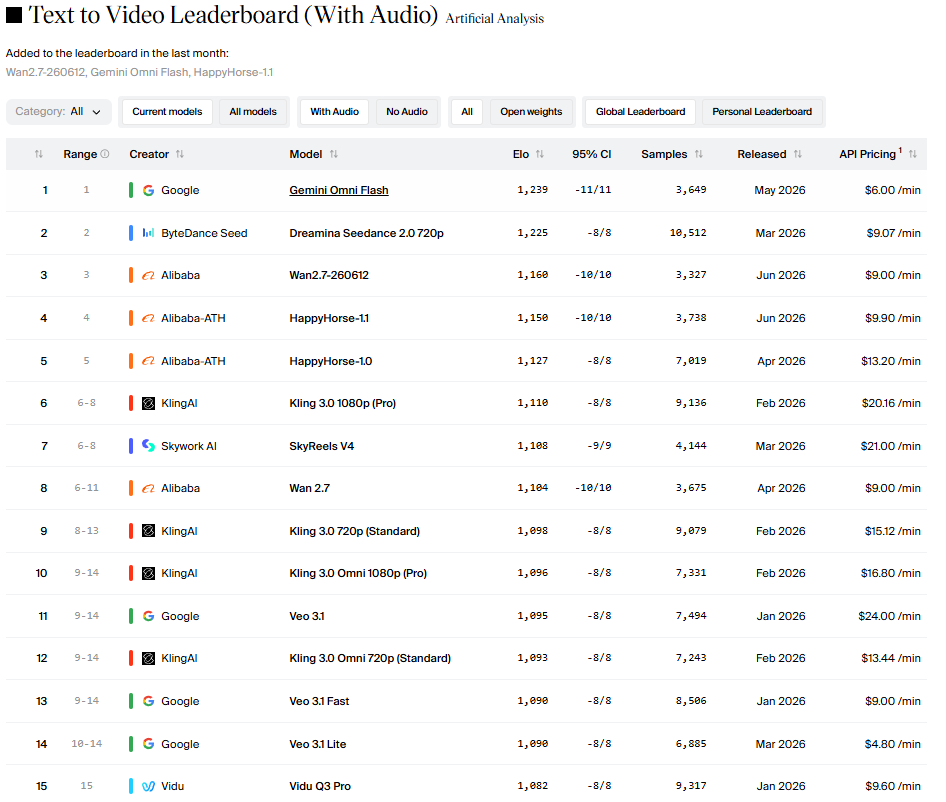
That leaderboard is the Artificial Analysis “Text to Video (With Audio)” benchmark, updated through July 2026. Here’s what it shows:
Google’s Gemini Omni Flash sits at #1 with an ELO of 1,239. ByteDance’s Dreamina Seedance 2.0 is at #2 with 1,225. Wan2.7 and HappyHorse-1.1 from Alibaba hold #3 and #4. Then Kling 3.0 1080p Pro comes in at #6 with an ELO of 1,110.
That’s still a strong position. Six of the top 15 slots on this leaderboard belong to Kling variants, which tells you the model family is genuinely competitive. But a number of competitors have closed the gap since February, and Gemini Omni Flash specifically at $6.00/min versus Kling Pro’s $20.16/min is a pricing comparison that matters if you’re doing volume.
One thing the leaderboard also shows: Veo 3.1 from Google sits at #11 with ELO 1,095 but costs $24.00/min at API pricing. Kling 3.0 Standard at #9 (ELO 1,098) costs $15.12/min. So for similar quality, Kling’s API pricing undercuts Veo 3.1’s by a meaningful margin, which is worth knowing if you’re building an ad production pipeline on API.
The Real Pricing (Including the Renewal Gotcha)
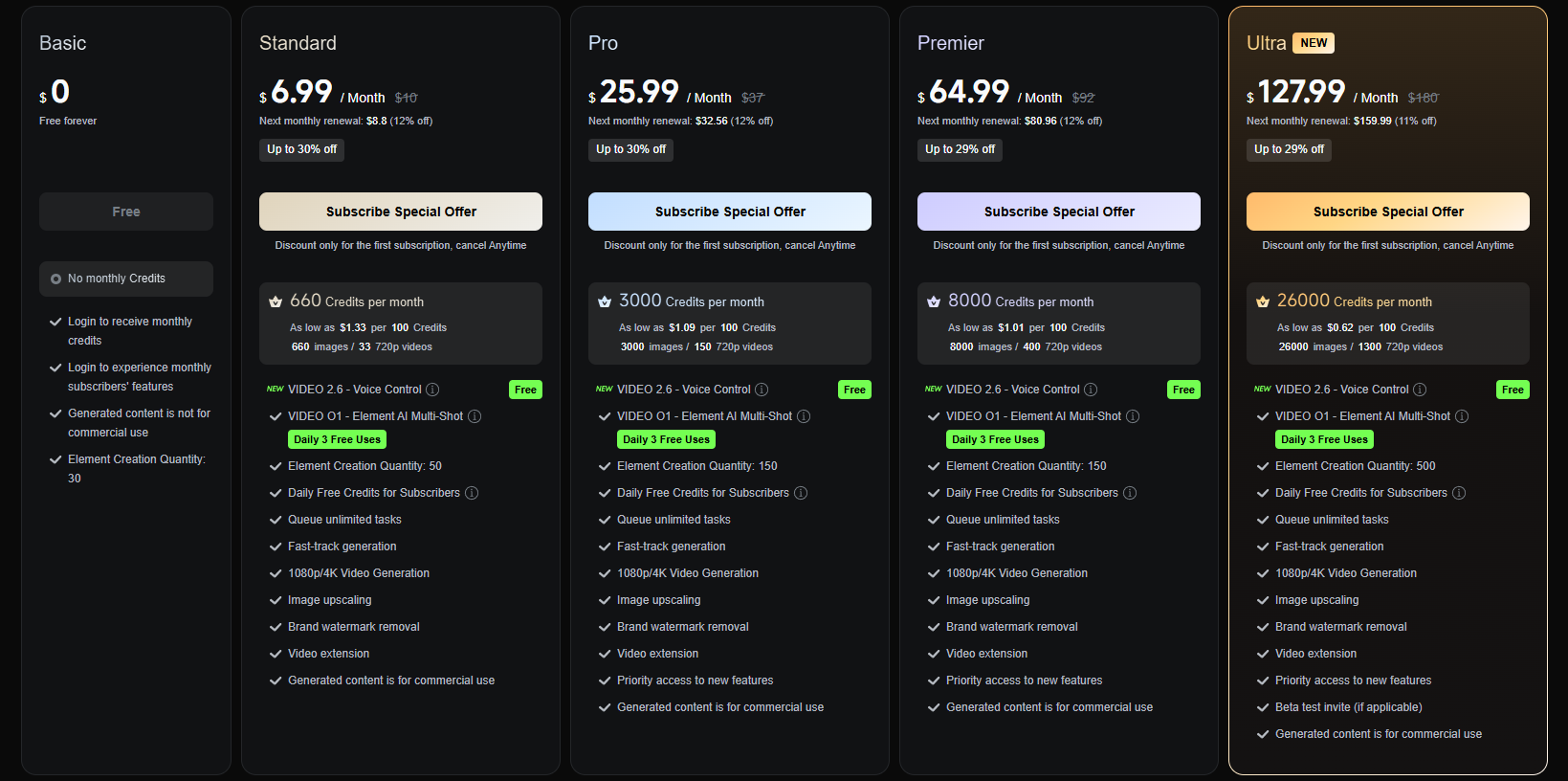
Here’s the pricing from the real page, and there are two things worth flagging that most reviews skip entirely.
The intro vs renewal pricing gap. Standard is $6.99/month for your first subscription. It renews at $8.80. Pro is $25.99 intro, renewing at $32.56. Premier is $64.99 intro, renewing at $80.96. The page does show this, but it’s easy to miss in smaller text under the main price. Your real ongoing cost is the renewal number, not the intro price.
Basic is not for commercial use. This one trips a lot of people up. The free Basic plan explicitly says “Generated content is not for commercial use.” If you’re producing ads on the free tier, you’re technically violating Kling’s terms. Every paid plan from Standard upward includes commercial rights.
Now the credit math. Standard gives you 660 credits per month. A single 10-second video at 1080p Pro quality costs approximately 200 credits. That’s 3 videos on the Standard plan. Pro gives you 3,000 credits, which is about 15 videos at Pro quality. Premier at 8,000 credits gets you around 40 videos. Ultra at 26,000 credits gets you around 130.
One more real issue documented by multiple users: credits get deducted even for failed generations. If Kling produces something unusable and you regenerate, both attempts cost credits. Heavy testers with low prompt accuracy burn through budgets much faster than the math above suggests.
| Plan | Intro Price | Renewal Price | Credits/Month | Approx Videos (10s 1080p) | Commercial Use |
|---|---|---|---|---|---|
| Basic | $0 | $0 | None | 0 (login daily credits only) | No |
| Standard | $6.99/mo | $8.80/mo | 660 | ~3 at Pro quality | Yes |
| Pro | $25.99/mo | $32.56/mo | 3,000 | ~15 at Pro quality | Yes |
| Premier | $64.99/mo | $80.96/mo | 8,000 | ~40 at Pro quality | Yes |
| Ultra (NEW) | $127.99/mo | $159.99/mo | 26,000 | ~130 at Pro quality | Yes + Beta access |
What Kling 3.0 Actually Does for Video Ads
Now the actual capabilities, because they’re genuinely interesting for ad production.
The multilingual feature is real and it’s the strongest argument for Kling over most competitors. Kling 3.0 supports multilingual speech with dialects and accents, character-driven dialogue with accurate lip sync, and multi-character scenes where you can specify who speaks what, when, and in which language. That last part is a meaningful workflow change for anyone running multi-market campaigns. You’re not re-dubbing or re-editing, you’re specifying language parameters at the generation stage.
The multi-shot feature is the other one worth knowing for ads. Most AI video tools generate a single continuous shot. Kling 3.0 can stitch multiple scenes together from separate “Scene-style” prompts into one output. For a product ad that needs an intro, a feature showcase, and a call-to-action, that’s a production step you’re skipping entirely.
David Roberts, founder of Dundy AI and someone actively building AI systems for video ad production, tested this on X:
💬 Expert quote, verified: “Kling 3.0 Multi Shot – AI UGC Ad Generation Test. This was the output of my first gen using Kling’s multi-shot feature, which allows you to add multiple Scene-style prompts, and then the generation stitches together all of those scenes into a final video. Honestly, pretty [impressed].”
Kling 3.0 Multi Shot – AI UGC Ad Generation Test
This was the output of my first gen using Kling’s multi-shot feature, which allows you to add multiple “Scene-style” prompts, and then the generation stitches together all of those scenes into a final video.
Honestly, pretty… pic.twitter.com/LpEv5tnV2c
— David Roberts (@recap_david) February 6, 2026
The rest of the feature set: 15-second clips (longer than Runway’s 40 seconds cap, matching Veo 3.1’s 60-second cap at shorter durations), native 4K output, character consistency across cuts, text rendering in ads and subtitles, and 16:9, 9:16, and 1:1 aspect ratios covering TikTok, YouTube, and Instagram without re-editing.
Where it falls short: character consistency across multiple separate generations is still unpredictable. If you’re building a series of ads featuring the same character across 15 clips, you’ll hit inconsistency issues that require significant prompting work to manage. And Kling’s customer support has been documented as unreliable, billing issues and unresponsive support are the most common complaints from 2025 and 2026 users.
For anyone evaluating Kling as part of a broader AI marketing stack, our Canva Grow 2.0 review covers the tool that handles the publishing and campaign management side, and our piece on whether AI agent freelancing is worth it is useful if you’re deciding between building in-house AI ad workflows vs hiring someone who already has.
Kling AI vs Veo 3.1 for Ad Creation
These two get compared most often for serious ad production. Here’s the honest side-by-side.
Kling 3.0 Pro (ELO 1,110, $20.16/min API) vs Veo 3.1 (ELO 1,095, $24.00/min API): Kling is slightly higher-ranked and cheaper per minute at API pricing. But Gemini Omni Flash at #1 (ELO 1,239, $6.00/min) undercuts both on price and outperforms both on benchmark score, which is worth factoring in if you have API access.
For direct ad use cases specifically, where Kling wins is multilingual lip sync and multi-shot stitching. Veo 3.1 doesn’t have the same native multilingual dialogue control. For prompt adherence and cinematic accuracy on a single-shot basis, Veo 3.1 is closer, but Kling’s workflow for iterative ad production (generate, extend, refresh) is more fleshed out.
If you’re building at TikTok ad scale and need 50+ variants of a campaign, Kling’s credit pool system and direct video extension feature make iteration faster. If you’re producing one high-quality hero video with max cinematic accuracy, the leaderboard suggests Gemini Omni Flash is the better call at lower cost.
Our best free AI image generator July 2026 tier list covers the static image side of this picture, useful context if your ad creative workflow mixes video with image-based assets.
Is Kling AI Worth It for Video Ads?
For high-volume ad production with multilingual requirements, yes at the Pro tier. Score: 4/5
Worth it if you’re producing 10 or more video ads per month, need multilingual output without re-dubbing, work across TikTok, Instagram, and YouTube (the aspect ratio support handles all three), and are comfortable treating Kling as an acquisition layer that feeds into DaVinci Resolve or Premiere for final polish. At $32.56/month renewal for Pro, that’s cost-effective against what multilingual video production actually costs traditionally.
Not worth it if you run occasional campaigns and don’t need the volume. Standard at $8.80/month renewal only gets you 3 Pro-quality videos, which is a small number for the hassle of learning the credit system. Not worth it if you need consistent character identity across a long series, that’s still a rough edge in Kling’s output. And not worth it if you need reliable customer support, that’s genuinely Kling’s weakest point.
One honest note on the benchmark position: Kling was #1 in February 2026. It’s #6 now. That doesn’t make it bad, it’s still a strong model with four variants in the top 12. But if you’re choosing based on “best AI video model,” the leaderboard says you should at least test Gemini Omni Flash before defaulting to Kling. The multilingual ad production use case is still Kling’s strongest differentiator.
FAQ
1. Is Kling AI worth it for video ads in 2026? For regular, high-volume ad production, yes, especially if you need multilingual output. The Pro plan at $25.99 intro ($32.56 renewal) gives you enough credits for around 15 videos per month at 1080p quality. For occasional campaigns, the Standard plan’s 660 credits only covers about 3 Pro-quality videos, which may not justify the cost.
2. Does Kling 3.0 support multilingual video ads? Yes. Kling 3.0 supports multilingual speech with dialects and accents, character-driven dialogue with accurate lip sync, and multi-character scenes where you specify who speaks what language. This is one of its strongest differentiators for multi-market ad campaigns.
3. Is Kling AI still the best AI video generator in 2026? Not by current benchmarks. As of July 2026, the Artificial Analysis leaderboard shows Google’s Gemini Omni Flash at #1 (ELO 1,239) and Kling 3.0 1080p Pro at #6 (ELO 1,110). Kling still has multiple strong variants in the top 12, but it’s no longer the undisputed leader it was in February 2026.
4. Can I use Kling AI’s free plan for commercial video ads? No. The Basic free plan explicitly states “Generated content is not for commercial use.” You need a paid plan starting at Standard ($6.99/month intro, $8.80/month renewal) to use Kling-generated content in commercial ad campaigns.
5. How many video ads can I make per month on Kling AI Pro? Roughly 15 videos at 10 seconds, 1080p quality, which costs approximately 200 credits each. Pro gives you 3,000 credits per month. Note that failed generations also deduct credits, so prompt testing on a new campaign can eat into that estimate faster than expected.
- Is Canva Grow 2.0 Worth It for Small Business? — covers the publishing and campaign management side that Kling doesn’t handle. The two tools complement each other for an end-to-end ad workflow.
- Best Free AI Image Generator July 2026: Tier List — relevant if your ad creative workflow mixes video with image-based assets from Meta Muse Image, Nano Banana 2, or GPT Image 2.
- Is AI Agent Freelancing Actually Worth It? — useful if you’re deciding between building an in-house AI ad production workflow vs hiring someone who already has it set up.
- How to Make Money With AI Instead of Losing Your Job — the broader context for how AI video tools like Kling are changing what solo creators and small teams can produce.
Related Web Stories:
- Meta Just Put AI Image Gen in Your Instagram
- Claude vs Grok 4.5 vs GPT-5.6: Who Wins?
- The AI Squish Trend, Tested and Explained