
How to Cut Claude API Costs Using the Opus 5 Effort Toggle (~40% Savings)
Quick Answer: Claude Opus 5 launched July 24, 2026 at $5/$25 per million tokens and added a five-level effort toggle (min, low, medium, high, xhigh, max). The sticker price didn’t change from Opus 4.8, but the way you cut costs with Opus 5 changed completely. Thinking is now on by default, so your bill is driven by how much reasoning the model does, not just how many words you send it. Route your routine 80% through low or medium effort. Reserve high and xhigh for the hard stuff. That single routing discipline is where the ~40% bill cut comes from.
There’s a specific moment a lot of developers hit with Claude. You’re building something, the API is working great, and then the bill arrives and it’s two or three times what you expected. You go back and look and yes, every single call was running at full reasoning depth, on tasks that genuinely didn’t need it. Formatting a JSON file. Summarizing a short document. Generating a simple unit test. All of them sitting at the same cost as your most complex architectural analysis.
That’s the problem Anthropic built the effort toggle to fix. And with Claude Opus 5, which launched on July 24, 2026 as the new everyday workhorse for coding and agentic work, getting this right matters more than ever, because one thing changed quietly in this release that most coverage glossed over: thinking is now on by default.
On Opus 4.8, you had to explicitly turn thinking on. On Opus 5, it’s running unless you tell it otherwise. That means if you migrated from 4.8 to Opus 5 without changing anything, your costs are almost certainly higher than they need to be already, not because Opus 5 is more expensive per token (it’s not, same $5/$25 pricing), but because it’s doing more reasoning per call by default.
The effort toggle is how you cut claude API costs without switching models or sacrificing quality on the tasks that actually need it. Here’s exactly how it works.
What Claude Opus 5 Actually Costs (Real Numbers From Official Sources)
Before getting into the effort toggle, let’s get the pricing straight, because there’s a lot of confusion between subscription costs and API token costs.
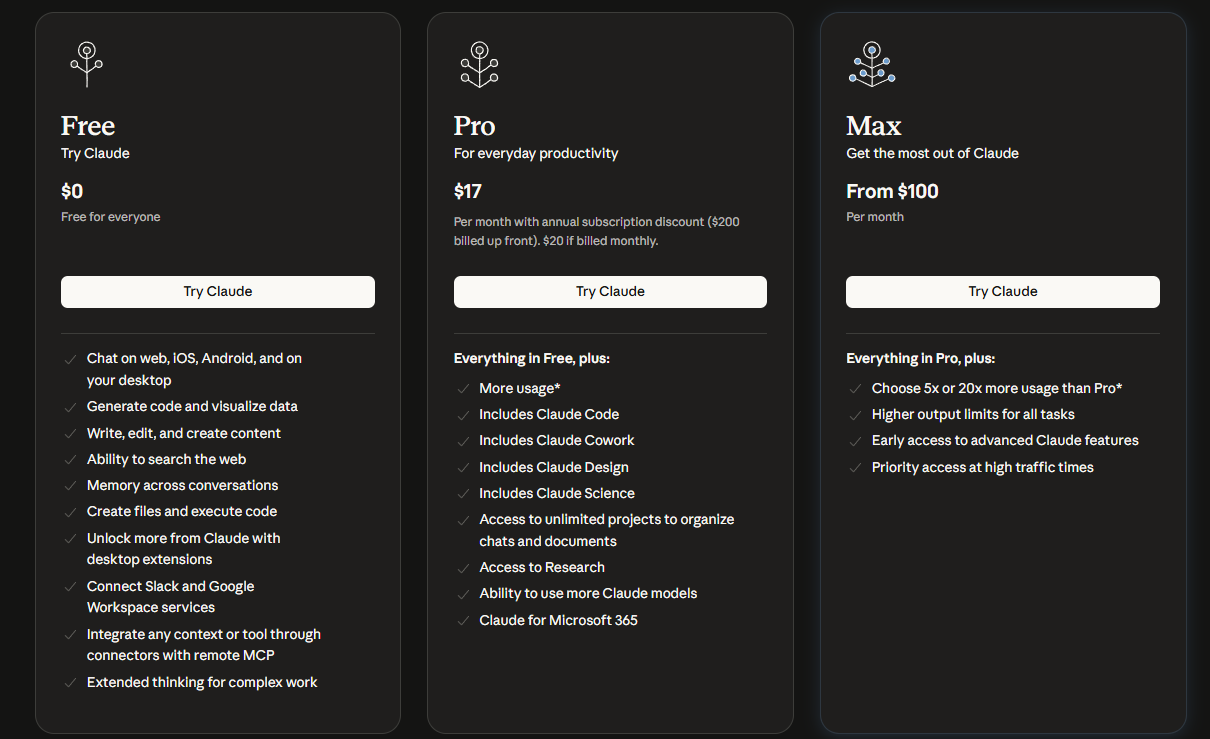
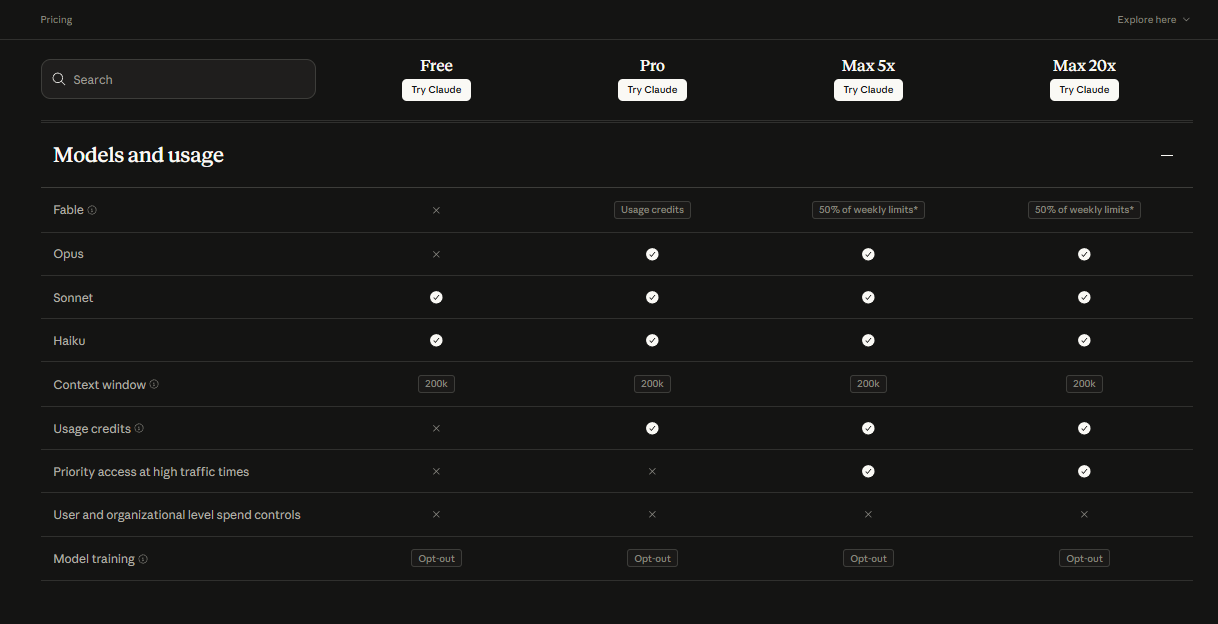
Those two screenshots show the consumer subscription pricing, which is what you pay on claude.ai for access to the tools. That’s separate from API pricing, which is what developers pay per token when calling the API directly.
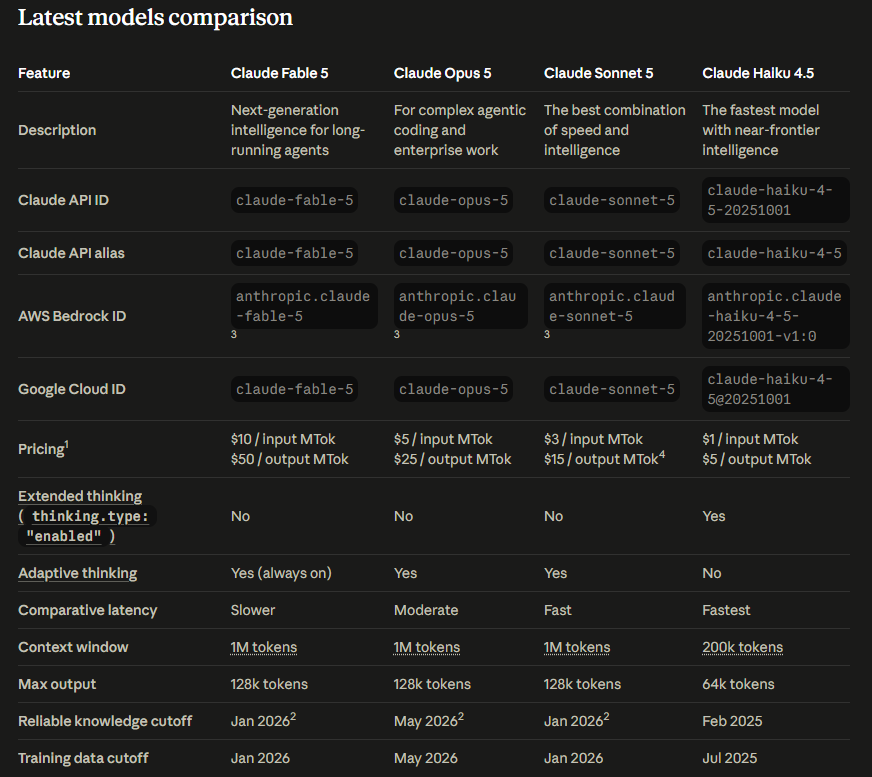
That third screenshot is the official API pricing from Anthropic’s docs. Claude Opus 5 runs $5 per million input tokens and $25 per million output tokens. That’s the same as Opus 4.8 and exactly half of Fable 5’s input price. Sonnet 5 is cheaper at $3/$15, and Haiku 4.5 is the budget option at $1/$5.
Here’s what makes the effort toggle matter so much: on Claude Opus 5, reasoning tokens (the “thinking” the model does internally before answering) bill as output tokens. So a call that runs high effort might generate 500 tokens of thinking before producing a 200-token answer. You’re billed for all 700 tokens at $25 per million. A low-effort call on the same prompt might use 50 tokens of thinking and produce the same 200-token answer. You’re billed for 250 tokens. That’s the lever.
| Model | Input (per M tokens) | Output (per M tokens) | Context Window | Thinking Default |
|---|---|---|---|---|
| Claude Fable 5 | $10 | $50 | 1M tokens | Always on (no toggle) |
| Claude Opus 5 | $5 | $25 | 1M tokens | On by default, 5-level toggle |
| Claude Sonnet 5 | $3 (rises to $3 Sep 1) | $15 | 1M tokens | On by default |
| Claude Haiku 4.5 | $1 | $5 | 200k tokens | Extended thinking: yes (explicit) |
One detail from Image 2 worth calling out: if you’re on Claude Pro and want to use Opus 5, it’s available with a checkmark. Fable 5 on Pro shows as “Usage credits” which means it burns from a separate credits pool rather than your regular plan usage. If you’re trying to cut costs on API calls specifically, the subscription tier affects your access, but your actual API spend is billed separately per token regardless of which plan you’re on.
How the Effort Toggle Actually Works (Not How It Sounds)
The effort toggle on Claude Opus 5 has five levels: min, low, medium, high, xhigh, and max. High is the default when you don’t specify anything.
Here’s the thing most explanations get wrong: the effort toggle controls how much the model thinks, not how much it says. These are two completely different things.
💬 Expert quote, verified: QWE AI Academy, July 27, 2026: “Here’s the hot take everyone launching a takedown of Opus 5 today is going to miss: the interesting thing about Claude Opus 5 isn’t that it’s smarter. It’s that Anthropic finally admitted most of us don’t need smarter. We need cheaper thinking on demand.”
Source: 👉 https://www.qwe.edu.pl/tutorial/claude-opus-5-hands-on-guide/
That quote nails it. If you set effort to low on a prompt asking for a 500-word summary, you’ll still get a 500-word summary. It won’t be shorter just because you turned the effort down. What changes is how much internal reasoning the model does before writing that summary. For a task like summarizing a document, that reasoning step adds almost no value. For a task like debugging a race condition in concurrent code, it adds a lot.
Here’s the practical breakdown by effort level:
Min: Minimal internal reasoning. Use for mechanical tasks: formatting, renaming, template filling, simple Q&A with obvious answers. Cheapest and fastest.
Low: Light reasoning. Good for most writing tasks, basic code edits, straightforward classification, short document analysis.
Medium: Solid default for most feature work, code review on straightforward code, knowledge-base queries, most agentic tasks. This is the sweet spot for the bulk of what teams actually do.
High: The default on Opus 5 if you don’t specify anything. Longer reasoning, multiple approaches considered, self-verification. Use for bug investigation, architectural decisions, anything where you’d normally iterate 2-3 times.
Xhigh: Deeper still. Good for complex multi-file refactors, race conditions, hard migrations, and tasks that have failed at lower effort settings.
Max: Everything the model can do. Use sparingly, for genuinely frontier-level work where quality is the only variable that matters.
One more thing competitors don’t mention clearly: you can combine the effort level with a separate “budget_tokens” cap. Effort is qualitative (how deeply to reason). Budget_tokens is a hard quantitative ceiling (maximum thinking tokens to spend). Set effort to high but cap budget_tokens at 2000 if you want thorough reasoning that can’t run away on unexpectedly complex inputs.
How to Actually Cut Claude API Costs by ~40%
The ~40% cut comes from one specific discipline: routing. Routing routine work to lower effort and reserving high effort for the hard minority of tasks.
Here’s the math. If you’re running 1000 calls a day at high effort and the average call generates 800 thinking tokens plus 300 output tokens, you’re paying for 1,100 output tokens per call. At $25 per million, that’s $27.50 per day.
If you route 80% of those calls (the ones that don’t need deep reasoning) to medium effort, and those average 150 thinking tokens plus 300 output tokens instead, those calls cost $0.009 each. The remaining 20% at high effort still cost $0.0275 each. Your new daily total: around $17.50. That’s a 36-40% reduction depending on the actual split.
Harvey (an AI legal software company, one of Anthropic’s launch partners) reported that Opus 5 at medium effort matched maximum-reasoning outputs in their workflows while generating 26% fewer tokens on average. That was with no effort routing at all, just using the better-calibrated model. Add proper effort routing on top of that and the savings compound.
The routing strategy that works:
Tasks to run at low effort: formatting, renaming, template generation, simple lookups, obvious answers, data transformation.
Tasks to run at medium effort: code review on routine code, summarization, feature descriptions, most content generation, standard agentic tasks.
Tasks to run at high effort: architecture decisions, hard bugs, complex migrations, anything that’s failed at lower effort.
Tasks to run at xhigh or max effort: frontier-level agentic work, the hardest 5% of your task volume, anything where you’d otherwise consider using Fable 5.
A second, less obvious way to cut claude API costs: the cache minimum dropped from 1024 tokens to 512 tokens on Opus 5. If you have prompts that were previously too short to cache on Opus 4.8, they can now create cache entries with no code changes. Cache hits on repeated prompts are significantly cheaper than fresh calls. Go check your shorter prompts.
Our does Claude Cowork replace ChatGPT Enterprise piece covers the broader cost-and-capability evaluation if you’re also deciding between enterprise AI tools at the product level, not just API calls.
The Fast Mode Traps Nobody Is Talking About
Fast mode is advertised as a way to get 2.5x faster responses at 2x the price. That sounds like a reasonable latency-cost tradeoff. There are two things about Fast mode that will surprise you if you’re not prepared.
Trap 1: Fast mode doubles the per-token price. Fast mode for Claude Opus 5 costs $10 per million input tokens and $50 per million output tokens. That’s exactly double the base rate. Combine that with thinking-on-by-default and a high effort setting on a live coding session, and you can burn through budget in ways that feel disconnected from what you actually asked for. Always set your effort level explicitly before enabling Fast mode.
Trap 2: Fast mode is API-only, not available everywhere. Fast mode for Claude Opus 5 is only available through the Claude API directly. It is not currently available on Amazon Bedrock, Google Cloud Vertex AI, or Microsoft Azure Foundry. If your team standardized on Bedrock for compliance reasons, the 2.5x speedup is completely off the table. This doesn’t come up in most reviews because they’re written from an API-first perspective. Worth checking before you plan around it.
Use Fast mode when you’re in an interactive loop and the speed buys back your attention, a coding session where you’re watching the output and iterating in real time. Don’t use it for unattended overnight agent runs where speed doesn’t matter and the extra cost is pure overhead.
For anyone evaluating Opus 5 alongside open-source alternatives like Ornith-1.0, our Ornith-1.0 review covers the free self-hosted option that some teams are using specifically to avoid per-token billing entirely.
Is Claude Opus 5 Worth It vs. Just Using Fable 5 or Sonnet 5?
Here’s the honest comparison based on what the data actually shows.
Versus Fable 5: Opus 5 at max effort performs within 0.5% of Fable 5’s best CursorBench result while costing half as much per token on input. Fable 5 is still better on long-horizon autonomous agents and cybersecurity tasks where Mythos 5 capabilities matter. For the majority of coding, knowledge work, and agentic tasks, Opus 5 at xhigh effort delivers near-Fable-5 results at half the price. Unless your work specifically requires Fable 5’s frontier edge, Opus 5 with proper effort routing is the better value.
Versus Sonnet 5: Sonnet 5 is cheaper at $3/$15 per million and genuinely fast. For routine work that doesn’t need complex multi-file reasoning, Sonnet 5 is a better pick than Opus 5 at low effort, because you’re paying for Opus’s superior reasoning capability and not using it. A good rule of thumb: if a task doesn’t need multi-file context, complex reasoning, or agentic tool use, Sonnet 5 is probably the right call.
The most cost-efficient stack for most teams: Sonnet 5 for the easy 60%, Opus 5 at medium for the next 30%, Opus 5 at high or xhigh for the hard 10%. That routing discipline gives you near-frontier capability where you need it and budget-friendly costs everywhere else.
For the full frontier model comparison including Grok 4.5 and GPT-5.6, our GPT-5.6 vs Grok 4.5 vs Claude piece covers how Opus 5 fits into the broader landscape.
Verdict: Is the Effort Toggle Worth Using?
Yeah, and this isn’t close. The effort toggle is the most useful API cost control Anthropic has shipped since they added prompt caching, and it’s included at no extra cost. Score: 4.5/5
Worth it for: any developer or team paying a Claude API bill who isn’t already explicitly setting effort levels per task. If you’re on Opus 5 with no effort configuration, you’re almost certainly overpaying. Harvey’s 26% token reduction with no routing, just using the model, tells you how much headroom there is.
Not the full picture for: teams on fixed subscription plans (Pro or Max) who aren’t using the API directly. The effort toggle is an API feature. On claude.ai’s chat interface, the model handles reasoning depth automatically and you don’t have direct effort control the same way.
One honest caveat: effort is not an on/off switch for quality. Dropping from xhigh to low on a task that genuinely needs deep reasoning will produce a worse answer. The key is knowing which of your tasks actually need deep reasoning (fewer than you think) and which ones are getting it for free (more than you’d expect). Run your own evals on your own tasks before rewiring anything in production.
FAQ
1. How do I cut Claude API costs with the effort parameter? Set effort explicitly per task type rather than letting Opus 5 run at its high default for everything. Route mechanical tasks to low effort, routine feature work and code review to medium, and reserve high and xhigh for genuinely complex reasoning tasks. This routing discipline, applied consistently across a realistic workload, cuts API bills by roughly 30-40% without meaningful quality loss on the tasks that don’t need deep reasoning.
2. How does the Claude Opus 5 effort toggle work? The effort toggle (min, low, medium, high, xhigh, max) controls how many thinking tokens the model spends before generating a response. Higher effort means more internal reasoning, more tokens billed as output, higher cost and latency. Crucially, it controls thinking depth, not response length. Turning effort down doesn’t shorten the answer; it reduces the internal reasoning that happens before the answer is written.
3. Does Claude Opus 5 Fast mode double the cost? Yes, exactly. Fast mode on Claude Opus 5 costs $10 per million input tokens and $50 per million output tokens, exactly double the standard $5/$25 rate. It delivers about 2.5x faster responses, which can be worth it in interactive coding sessions where latency matters. It’s not available on Amazon Bedrock, Google Cloud, or Microsoft Foundry, only on the Claude API directly.
4. Is Claude Opus 5 worth it vs Fable 5 for coding? For most coding tasks, yes. Opus 5 at xhigh effort performs within 0.5% of Fable 5’s best coding benchmark at half the input cost. Fable 5 is still better for long-horizon autonomous agents and tasks that genuinely need frontier-level reasoning. For the bulk of real coding work, multi-file refactors, code review, debugging, Opus 5 with proper effort routing is the better value.
5. Which Claude Opus 5 effort level should I use? Start at the default (high) and adjust based on your results. Low or medium handles most routine code edits, summarization, and content generation. High handles most complex coding and agentic tasks. Use xhigh when high effort isn’t cutting it on hard problems. Use max sparingly, only when quality is the only variable and cost doesn’t matter. Anthropic’s own documentation recommends starting at xhigh for coding work and stepping down until quality holds.
- Is Ornith-1.0 Worth It for Developers? — the free, open-source alternative for teams trying to avoid per-token billing entirely.
- GPT-5.6 vs Grok 4.5 vs Claude: Which Is Better? — how Opus 5 fits into the broader frontier model landscape including GPT and Grok alternatives.
- Does Claude Cowork Actually Replace ChatGPT Enterprise? — the enterprise-level product comparison relevant if you’re evaluating the full Claude ecosystem, not just API costs.
- Is AI Agent Freelancing Actually Worth It? — real rate data for developers thinking about turning Claude API expertise into billable services.
Related Web Stories:
- Claude vs Grok 4.5 vs GPT-5.6: Who Wins?
- Why Claude Now Wants Your Government ID
- The AI Squish Trend, Tested and Explained
1 thought on “How to Cut Claude API Costs With Opus 5 Effort Toggle?”