
Is Canva Grow 2.0 Worth It for Small Business? (Honest Review)
Quick Answer: Canva Grow 2.0 is genuinely useful if you’re a small business owner who creates ads manually across Meta, TikTok, and LinkedIn right now. It combines creation, publishing, and performance tracking into one place. But the best features (AI Ad Tagging, custom reports) are locked behind Canva Business or Enterprise. Worth it for marketing-active small teams, not worth it if you run occasional campaigns or are already happy with native ad managers.
So here’s a scenario a lot of small business owners know really well. You spend two hours designing ads in Canva, export them, log into Meta Ads Manager, re-upload everything, set up the campaign from scratch, then separately check TikTok, then check LinkedIn, and by the time you’re done managing the tools you’ve barely had time to think about the actual strategy. And then the campaign burns out in three weeks and you do it all again.
That’s exactly the problem Canva Grow 2.0 is trying to fix. Launched June 25, 2026 at the Cannes Lions Festival, it takes Canva from a design tool into something Canva is now calling an “end-to-end AI marketing engine.” You create the ad, publish it directly to Meta, TikTok, and LinkedIn from inside Canva, watch the performance, and get AI-generated suggestions on what to refresh. All without logging into three separate dashboards.
The pitch is aimed squarely at small businesses, freelancers, and solopreneurs who want to run multi-platform ad campaigns but don’t want to hire an agency or juggle a dozen tools to do it.
So the real question worth answering: is Canva Grow 2.0 actually worth it for a small business, or is it another feature that sounds better in a launch announcement than it works in real life? Let’s actually go through it.
What Canva Grow 2.0 Actually Does
This is where most coverage stops at the press release. Let me break down the six actual features from the official page so you know exactly what you’re getting.
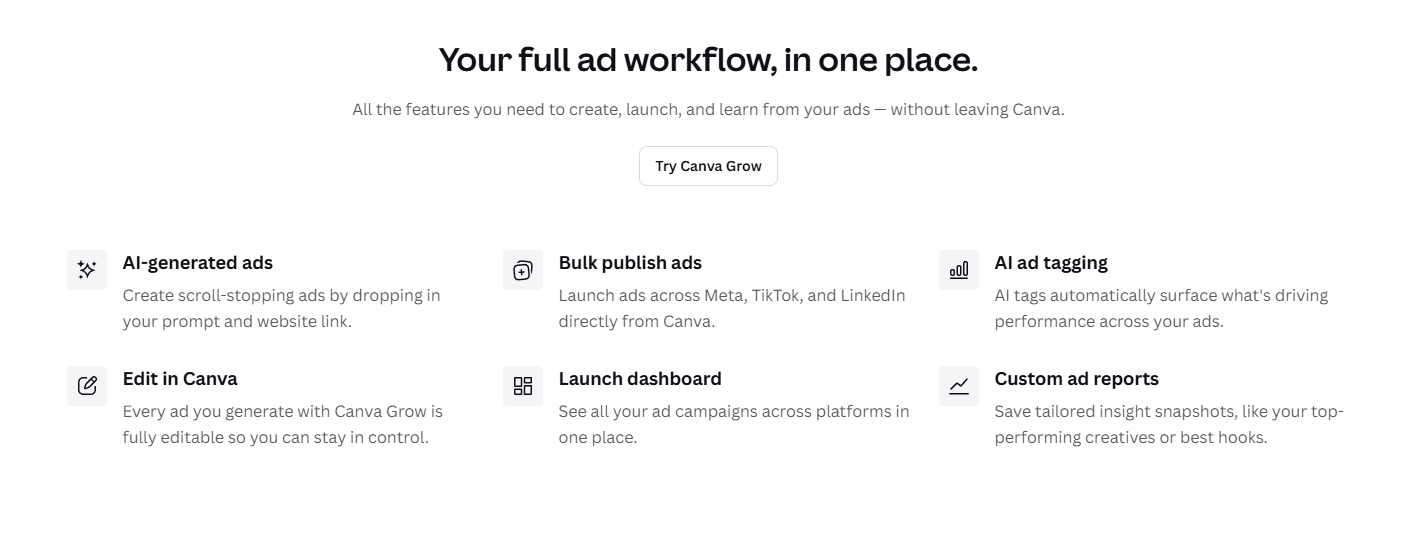
Looking at the real feature page, here’s what Canva Grow 2.0 actually includes:
AI-generated ads: Drop in a prompt and your website URL and Canva generates ad creatives for you. The system combines your brand context, audience signals, and past performance data to generate ads. Every output is fully editable in Canva’s editor via the Magic Layers integration.
Bulk publish ads: Launch ads across Meta, TikTok, and LinkedIn directly from Canva. Smart defaults handle the manual setup work that usually slows teams down between creation and going live. No more exporting files and logging into separate ad managers.
AI ad tagging: This is where it gets interesting. The AI automatically analyzes your ads and applies structured labels, surfacing what themes, formats, and creative elements are actually driving performance across large ad sets. Useful if you’re running dozens of variants and want to know what’s working. Important caveat on this one coming up.
Edit in Canva: Every ad generated through Canva Grow stays fully editable. You’re not locked into a static output.
Launch dashboard: A centralized view of every campaign running across all three platforms at once. Instead of toggling between Meta Ads Manager, TikTok Ads, and LinkedIn Campaign Manager, you see everything in one place.
Custom ad reports: Save tailored insight snapshots, like your top-performing creatives or best hooks, so you can bring those learnings into the next campaign.
Here’s the honest thing most articles don’t mention about this feature list: AI Ad Tagging and some of the deeper analytics features are only available on Canva Business and Canva Enterprise subscriptions, not Canva Pro. The basic publishing and creation features work on Pro, but the analytical layer (the part that actually tells you what’s working) sits behind the higher tier.
The Pricing Reality (What Your Plan Actually Gets You)
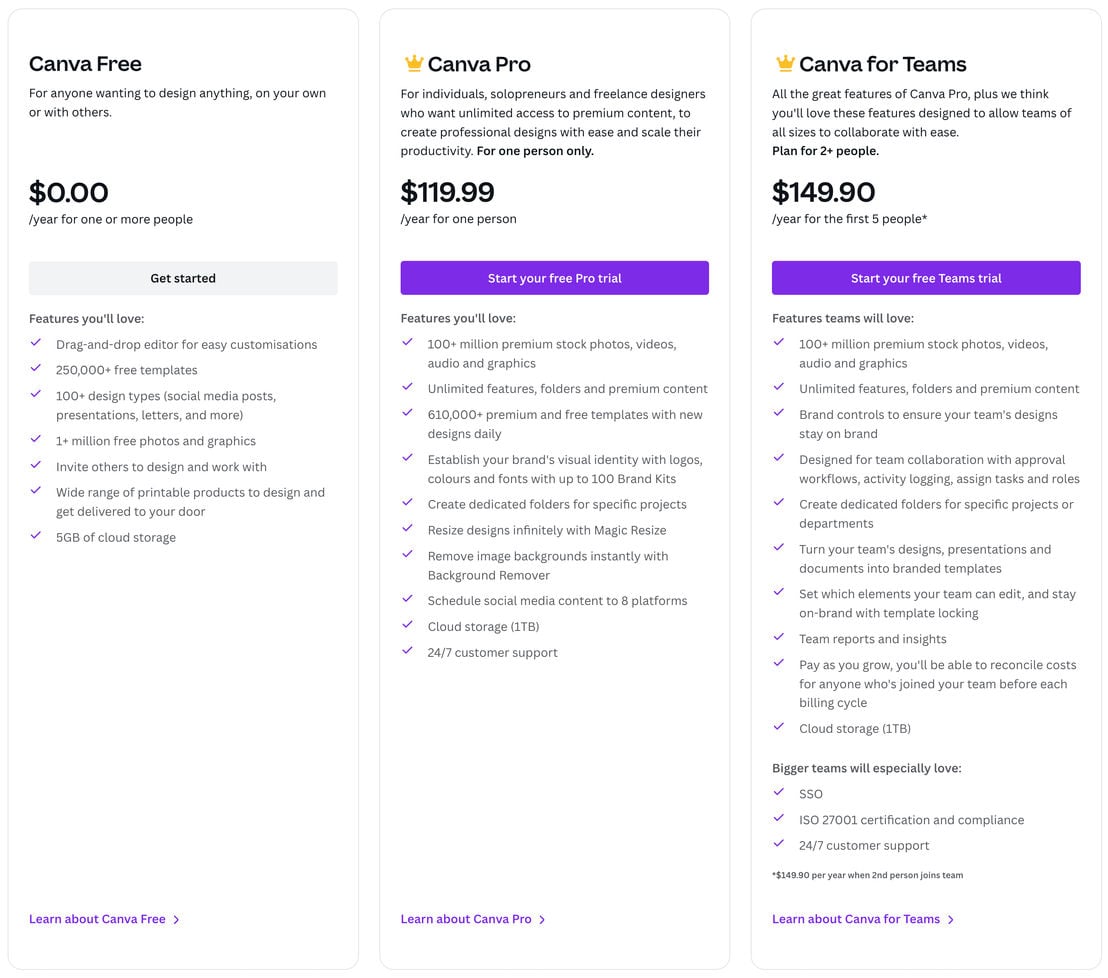
Looking at the real pricing page, here’s what you’re working with:
Canva Free is $0 but you won’t get Canva Grow 2.0’s publishing features at all. Canva Pro is $119.99/year for one person ($10/month effectively), which gives you access to basic Canva Grow features including ad creation and bulk publishing to Meta, TikTok, and LinkedIn. Canva for Teams is $149.90/year for the first 5 people, adding team collaboration features, brand controls, and approval workflows.
The thing that catches people off guard: AI Ad Tagging, the feature that automatically analyzes what’s driving performance in your campaigns, is specifically reserved for Canva Business and Canva Enterprise. Business is the next tier up from Teams, with pricing that requires a quote from Canva’s sales team. If the analytics layer is why you’re interested in Canva Grow 2.0, you need to factor in that additional cost before assuming the Pro or Teams plan covers it.
For most small businesses evaluating this, the practical question is whether the creation and publishing features on the Pro or Teams plan ($120-150/year) are worth it on their own, with the understanding that the deeper AI analytics is a Business-tier feature.
| Feature | Canva Free | Canva Pro ($119.99/yr) | Canva for Teams ($149.90/yr for 5) |
|---|---|---|---|
| AI-generated ads | No | Yes | Yes |
| Bulk publish to Meta, TikTok, LinkedIn | No | Yes | Yes |
| Launch dashboard | No | Yes | Yes |
| AI Ad Tagging | No | No | No (Business/Enterprise only) |
| Custom ad reports | No | Limited | Yes |
| Team collaboration and approvals | No | No | Yes |
Can Canva Grow 2.0 Replace Your Ad Agency?
This is the real question your article title asks, and the honest answer is: for some things yes, for others no.
What it genuinely replaces: the creative production process for straightforward ad campaigns. If you’re a small business spending $500-2,000/month on ads and your agency is mostly building ad graphics, writing basic copy variations, and scheduling posts across platforms, Canva Grow 2.0 automates a meaningful chunk of that workflow. The AI-generated ads aren’t as strategically nuanced as what a good agency does, but they’re not supposed to be. They’re designed to get you from zero to “live campaign” faster than any previous tool has managed.
What it doesn’t replace: strategy, audience targeting, bid optimization, landing page thinking, A/B test design, and the judgment calls that come from someone who’s run hundreds of campaigns and knows when something is wrong before the data shows it. An ad manager with real experience reads signals that aren’t in any dashboard. Canva Grow 2.0 can tell you which creative is outperforming after the fact. It can’t tell you before the campaign whether your offer will convert, or whether your audience is priced out, or whether your hook is going to land on TikTok specifically.
There’s also a structural risk worth understanding that most coverage glosses over. Shashi Bellamkonda, an independent marketing analyst, put it plainly in a July 2026 analysis:
💬 Expert quote, verified: “By filtering campaign creation, publishing, and optimization through a single vendor, marketing teams gain immense workflow convenience, but they consolidate their platform dependency in the process.”
Source: 👉 https://www.shashi.co/2026/07/canva-grow-20-makes-one-vendor-front.html
That’s not a reason to avoid the tool. It’s a reason to understand what you’re buying into. Canva Grow 2.0’s publishing layer runs on Meta, TikTok, and LinkedIn APIs that Canva doesn’t control. If any of those platforms changes API terms or access policies, Canva has to adapt, and your campaign pipeline waits. If you’re running a campaign for a product launch with a hard deadline, that dependency matters more than if you’re doing evergreen brand awareness campaigns.
For most small businesses running modest campaigns without hard dependencies on millisecond publishing accuracy, that risk is manageable. For agencies running client campaigns with tight deadlines and real money on the line, it’s worth keeping native ad manager access alive alongside Canva Grow, not replacing it entirely.
For comparison on how AI tools are genuinely changing what small teams can do without agency help, our piece on how to make money with AI instead of losing your job to it covers the broader shift that Canva Grow 2.0 is part of.
Who Should Actually Pay for This
Here’s the straight answer on who Canva Grow 2.0 is and isn’t worth it for.
It’s worth it if: You’re already using Canva Pro and paying a separate tool or person to publish ads across Meta, TikTok, or LinkedIn. Consolidating that into your existing Canva subscription is genuinely valuable, and the Pro plan at $119.99/year is cheap relative to what a social media manager or agency costs. You’re running multiple ad variants (Canva’s own data says platforms like Meta and TikTok are now hungry for 50 or more variants at a time) and spending hours exporting and re-uploading them. The bulk publish feature alone saves real time in that scenario. You’re a small team of 2-5 people who need to see all campaigns in one place and keep designs on-brand across members.
It’s not worth it if: You run occasional campaigns, maybe 1-2 a month, and are comfortable in native ad managers. The workflow convenience of Grow 2.0 pays off at volume, not at low frequency. You need serious analytics depth, CRM integration, or audience segmentation that goes beyond basic performance metrics. Right now Canva Grow doesn’t integrate with any CRM, which is a real gap for businesses that want to connect ad performance to customer lifetime value or lead nurturing. You need the AI Ad Tagging analysis but aren’t budgeting for Canva Business, because Pro doesn’t include it.
One more thing worth saying: the “replace your ad agency” framing from the launch announcement is aspirational, not literal. Canva Grow 2.0 replaces the production and logistics parts of what an agency does. It doesn’t replace the thinking, strategy, and judgment parts. If your agency is mostly doing the former, you may not need them anymore. If they’re doing the latter, you still do.
For context on how AI-powered marketing tools are stacking up against traditional agency work across the board, our Claude Cowork vs ChatGPT Enterprise comparison covers a parallel question in the AI productivity space. And our Meta Muse Image review covers the AI image generation tool that competes directly with Canva’s own AI creative outputs.
Is Canva Grow 2.0 Worth It for Small Business?
For marketing-active small businesses already running ads on Meta, TikTok, or LinkedIn, yeah, Canva Grow 2.0 is worth a serious look. Score: 4/5
The core value proposition is real: one place to create, publish, and track ads across three platforms. The AI-generated ad creation is genuinely useful for volume, the bulk publishing saves real time, and the Launch Dashboard is the kind of thing people build fragile spreadsheets to replicate manually. At $119.99/year for Pro or $149.90 for a 5-person team, the entry cost is low relative to what it replaces.
The honest limitation: if you want the AI analytics layer (AI Ad Tagging, deep custom reports), you’re looking at the Business or Enterprise tier, not Pro or Teams. That’s a meaningful feature gating decision that the launch coverage didn’t highlight clearly. And Canva Grow 2.0 won’t replace the strategic thinking an experienced media buyer brings, just the production and logistics work around it.
For a small business doing occasional campaigns, the free plan is probably enough. For one doing consistent multi-platform ad work, the Pro plan is likely already worth it for other Canva features, and Grow 2.0 becomes a compelling additional reason to stay there.
FAQ
1. Is Canva Grow 2.0 worth it for small business? For small businesses running regular ads across Meta, TikTok, or LinkedIn, yes. The AI-generated ad creation, bulk publishing, and unified Launch Dashboard replace a lot of manual work at $119.99/year for Pro or $149.90 for Teams. If you run occasional campaigns or need deep analytics, the value is less clear.
2. Can Canva Grow 2.0 replace a social media manager? Partially. It replaces the production and scheduling parts of that role well. It doesn’t replace strategy, audience targeting, bid optimization, or the judgment calls that come from campaign experience. Think of it as removing the manual logistics from a media manager’s day, not the thinking.
3. Is AI Ad Tagging available on Canva Pro? No. AI Ad Tagging, the feature that automatically analyzes what creative elements are driving performance, is reserved for Canva Business and Canva Enterprise subscribers. Basic ad creation and publishing are available on Pro.
4. Which ad platforms does Canva Grow 2.0 support? Currently Meta (Facebook and Instagram), TikTok, and LinkedIn. Canva has indicated more platform integrations are coming. Google Ads and YouTube are not yet supported, which is a gap for businesses whose ad spend is primarily search-driven.
5. What’s the difference between Canva Grow 1.0 and 2.0? Canva Grow 1.0, launched October 2025, focused on ad creation inside Canva. Version 2.0 added the full publishing and performance layer: Bulk Publish directly to Meta, TikTok, and LinkedIn, the unified Launch Dashboard, AI Ad Tagging, and Automatic Refresh Generation that uses performance learnings to suggest updated creative.
- How to Make Money With AI Instead of Losing Your Job — the broader context for how AI tools like Canva Grow 2.0 are shifting what small businesses can do without hiring specialists.
- Is Meta Muse Image Worth It? Honest AI Review — Meta’s own AI image tool competes directly with Canva’s AI ad creation. Worth knowing about before committing to Canva’s ecosystem.
- Does Claude Cowork Actually Replace ChatGPT Enterprise? — the same “can one tool replace a whole workflow” question applied to AI productivity tools for teams.
- Is AI Agent Freelancing Actually Worth It? — relevant if you’re evaluating whether to hire an AI-powered freelancer vs using Canva Grow 2.0 yourself.
Related Web Stories:
- Meta Just Put AI Image Gen in Your Instagram
- Claude vs Grok 4.5 vs GPT-5.6: Who Wins?
- The AI Squish Trend, Tested and Explained
2 thoughts on “Is Canva Grow 2.0 Worth It for Small Business?”